驾驶模式#
| 模式 | 描述 |
|---|---|
| Guided | 允许地面站直接控制Rover |
| Manual | 手动,不需要GPS |
| RTL(Return-To-Launch) | 返航,转向并尝试直接返回到上次解锁的位置 |
| Circle | 绕圈 |
| Auto | 执行mission |
| Loiter | 定点保持 |
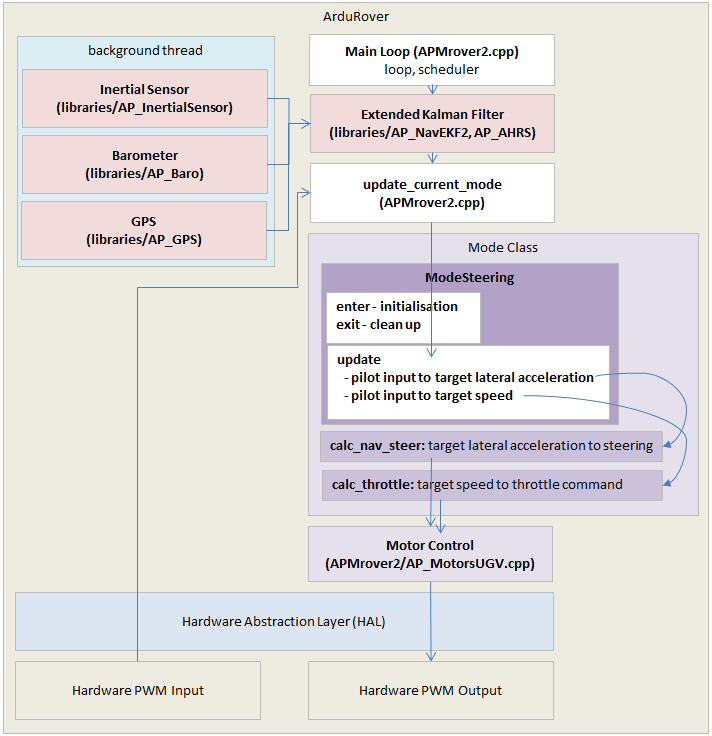
上图为添加一个新的驾驶模式的流程,其中APMrover2.cpp已经废弃,入口是Rover.cpp
完整的添加驾驶模式的流程可参照ardupilot仓库中添加Acro Mode的流程 ↗
- 在
defines.h的enum mode里添加新模式的名字 - 在
mode.h中声明新模式为一个类,一定要有mode_number(),name4()andupdate()三个函数,这个类从基类Mode继承来
class ModeAcro : public Mode
{
public:

    uint32_t mode_number() const override { return ACRO; }

    // methods that affect movement of the vehicle in this mode
    void update() override;

    // attributes for mavlink system status reporting
    bool has_manual_input() const override { return true; }
};- 创建新的类的源代码文件,在这个文件中实现
update()函数,这个函数一秒会调用50次,主要负责处理用户输入, 驾驶目标,调用油门等。例如mode_acro.cpp。
#include "mode.h"
#include "Rover.h"

void ModeAcro::update()
{
    float desired_steering, desired_throttle;
    get_pilot_desired_steering_and_throttle(desired_steering, desired_throttle);

    // convert pilot throttle input to desired speed (up to twice the cruise speed)
    float target_speed = desired_throttle * 0.01f * calc_speed_max(g.speed_cruise, g.throttle_cruise * 0.01f);

    // get speed forward
    float speed;
    if (!attitude_control.get_forward_speed(speed)) {
        // no valid speed so stop
        g2.motors.set_throttle(0.0f);
        g2.motors.set_steering(0.0f);
        return;
    }

    // determine if pilot is requesting pivot turn
    bool is_pivot_turning = g2.motors.have_skid_steering() && is_zero(target_speed) && (!is_zero(desired_steering));

    // convert steering request to turn rate in radians/sec
    float turn_rate = (desired_steering / 4500.0f) * radians(g2.acro_turn_rate);

    // set reverse flag backing up
    bool reversed = is_negative(target_speed);
    rover.set_reverse(reversed);

    // run speed to throttle output controller
    if (is_zero(target_speed) && !is_pivot_turning) {
        stop_vehicle();
    } else {
        // run steering turn rate controller and throttle controller
        float steering_out = attitude_control.get_steering_out_rate(turn_rate, g2.motors.have_skid_steering(), g2.motors.limit.steer_left, g2.motors.limit.steer_right, reversed);
        g2.motors.set_steering(steering_out * 4500.0f);
        calc_throttle(target_speed, false);
    }
}其中关于驾驶和油门控制的接口在 APM_Control/AR_AttitudeControl library 中
- 在
Rover.h里添加为友元类,并在Rover类里声明一个对象
friend class GCS_Rover;
friend class Mode;
friend class ModeAcro;
friend class ModeAuto;
friend class ModeGuided;
friend class ModeHold;
class Rover : public AP_HAL::HAL::Callbacks {
    ModeInitializing mode_initializing;
    ModeHold mode_hold;
    ModeManual mode_manual;
    ModeAcro mode_acro;
    ModeGuided mode_guided;
    ModeAuto mode_auto;
    ModeSteering mode_steering;
}- 在
control_modes.h的switchcase里添加新建的模式
设定Rover类型为船#
在Parameters.cpp中修改最后一个参数为2:
// @Param: FRAME_CLASS
    // @DisplayName: Frame Class
    // @Description: Frame Class
    // @Values: 0:Undefined,1:Rover,2:Boat,3:BalanceBot
    // @User: Standard
AP_GROUPINFO("FRAME_CLASS", 16, ParametersG2, frame_class, 2)使用Rover的 GPIO#
为了将 PWM/SERVO/MOTOR 输出设置为 GPIO 功能,需要将各个 SERVOx_FUNCTION 参数设置为 -1。每次自动驾驶仪初始化时,它都会向地面控制站发送一条日志消息。
设置 SERVOx_FUNCTION 为 -1 为使用GPIO,设置为 0 为使用 PWM,除非通过脚本或GCS发出指令,否则不会输出任何 PWM 信号。
某些基于 GPIO 的功能需要将 GPIO 引脚编号输入到相应的参数中。该引脚编号在自动驾驶仪的硬件定义文件中指定。通常,第一个支持 GPIO 的输出被分配到引脚 50,第二个被分配到引脚 51,依此类推。
Rover控制#
-
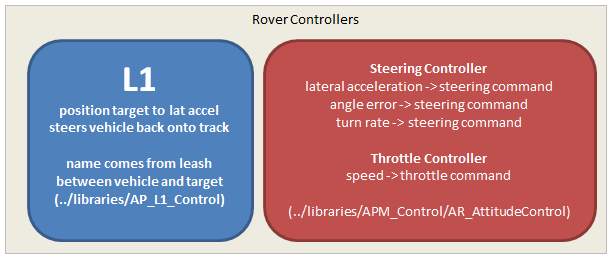
L1 控制器:将起点和终点(分别以纬度和经度表示)转换为横向加速度,使车辆沿从起点到终点的路径行驶。然后,该横向加速度被传递给转向控制器。(
AP_L1_Control.h) -
Steering Controller:转向控制器可以将所需的横向加速度、角度误差或所需的转弯速率转换为转向输出命令(表示为 -4500 到 +4500 范围内的数字),该命令应输入到电机库中(参见
AR_MotorsUGV.h)。 -
Throttle Controller:油门控制器可以将期望速度转换为油门指令(表示为 -100 到 +100 之间的数字),该指令应输入到电机库中(参见
AR_MotorsUGV.h)。
L1 导航#
以下旧内容仅供参考,目前 L1 导航文档已更新:https://ardupilot.org/dev/docs/rover-L1.html ↗
位于AP_L1_Control.h ,AP_L1_Control 类继承自抽象类 AP_Navigation ,重写部分成员函数
- AP_Navigation(参数定义):generic navigation controller interface
- waypoint(航路点):导航路径上的一个特定坐标点,通常由GPS提供其经纬度坐标。在GPS导航中,一条路线(Route)通常由起点、终点和一系列中间航路点构成。在GPS数据中,航路点(Waypoints)、路线(Routes)和轨迹(Tracks)是三种基本要素类型。
位置信息来自 AP_Common/Location.h 的 Location 类,成员主要包含经度纬度高度,还有一些接口
// note that mission storage only stores 24 bits of altitude (~ +/- 83km)
int32_t alt; // in cm
int32_t lat; // in 1E7 degrees
int32_t lng; // in 1E7 degrees// update L1 control for waypoint navigation
void update_waypoint(const class Location &prev_WP, const class Location &next_WP, float dist_min = 0.0f) override;该函数的输出是期望的水平加速度即图中的 latAccDem ,可以把rover带回A点到B点之间的航线,即计算需要多大的向心加速度,才能让载具沿着一条平滑曲线重新回到 A→B 航线上,规划的是一条如何回到航线的曲线。
该水平加速度始终垂直于当前速度方向,作用就是改变速度的方向。
Loiter Mode#
Loiter Mode ↗继承自Rove模式的Mode类,主要是让船体/车体徘徊在某个固定范围内,代码声明在 Mode.h 中,大致如下:
class ModeLoiter : public Mode
{
public:

    Number mode_number() const override { return Number::LOITER; }
    const char *name() const override { return "Loiter"; }
    const char *name4() const override { return "LOIT"; }

    // methods that affect movement of the vehicle in this mode
    void update() override;

    // attributes of the mode
    bool is_autopilot_mode() const override { return true; }

    // return desired heading (in degrees) and cross track error (in meters) for reporting to ground station (NAV_CONTROLLER_OUTPUT message)
    float wp_bearing() const override { return _desired_yaw_cd * 0.01f; }
    float nav_bearing() const override { return _desired_yaw_cd * 0.01f; }
    float crosstrack_error_m() const override { return 0.0f; }

    // return desired location
    bool get_desired_location(Location& destination) const override WARN_IF_UNUSED;

    // return straight-line distance (in meters) to destination
    float get_distance_to_destination() const override { return _distance_to_destination; }

protected:

    bool _enter() override;

    Location _destination;      // target location to hold position around
    float _desired_speed;       // desired speed (ramped down from initial speed to zero)
};获取期望的地点的接口,直接赋值
// get desired location
bool ModeLoiter::get_desired_location(Location& destination) const
{
    destination = _destination;
    return true;
}模式的初始化函数重写了Rover的Mode的 _enter()
初始化的过程主要是通过传感器设置偏航,其中期望的偏航角 _desired_yaw_cd 声明在 Mode 中,类型为 float ,单位是厘米,用于Auto, Guided 和 Loiter模式
对于错误处理,如果没有得到停止的位置则返回, 没有得到想要设定的速度则设定速度为0
bool ModeLoiter::_enter()
{
    // set _destination to reasonable stopping point
    if (!g2.wp_nav.get_stopping_location(_destination)) {
        return false;
    }

    // initialise desired speed to current speed
    if (!attitude_control.get_forward_speed(_desired_speed)) {
        _desired_speed = 0.0f;
    }

    // initialise heading to current heading
    _desired_yaw_cd = ahrs.yaw_sensor;

    return true;
}更新函数 update()#
先通过 get_distance 获取当前位置到目标的距离
然后获取巡航半径,其中 g2 的类型为 ParametersG2 ,这个类定义在参数头文件 Parameters.h 中,是用于管理扩展参数集合的一个核心类。因为早期的代码仓库主参数类太多了就扩展出g2。如果该 Rover 是帆船若启用帆船导航,那么会调用帆船类的获取徘徊半径的函数 get_loiter_radius ,不是的话该值会被赋值为 loit_radius ,该参数类型为 float 。
启用帆船导航的函数 tack_enabled 定义在 sailboat.cpp 里。
如果当前位置到目标的距离小于巡航半径,不启用帆船导航时,则半径内期望速度为0(启用帆船导航的情况下为0.1),最终通过角度控制类 attitude_control 的函数 get_desired_speed_accel_limited 获取受加速度限制的期望速度。如果帆船启用了导航,将船头方向指向真实的风向,真实风向通过 get_true_wind_direction_rad() 获取,其中 degree() 是在 AP_math.h 中定义的将弧度制转为角度制的函数
如果当前位置到目标的距离大于等于巡航半径,则利用有硬编码增益的P控制更新所需速度和,更新目标的方位。
硬编码增益的P控制的python实现如下(没在ardupilot源码里,仅举例)
# 硬编码增益的P控制器
class PController:
    def __init__(self, kp):
        self.kp = kp  # 硬编码增益

    def update(self, target, current_value):
        error = target - current_value
        output = self.kp * error
return output获取误差角度为目前的偏航角和传感器探测到的偏航角的差,wrap_180_cd 是AP_math.h 定义的把角度约束在±180度内的函数,通过函数模板实现。可适应多种类型。如果目的地在船的后面则转向。
确保帆船不要逆风航行,use_indirect_route 是定义在sailboat.cpp 里判断帆船是否逆风航行的函数。calc_heading 是在无法使用期望的航向时选择最佳航向的函数。
对于更新,通过控制油门 calc_throttle 达到期望速度,和驾驶函数 calc_steering_to_heading 更新偏航角来更新位置,这两个函数定义在 Mode.cpp
void ModeLoiter::update()
{
    // get distance (in meters) to destination
    _distance_to_destination = rover.current_loc.get_distance(_destination);

    const float loiter_radius = g2.sailboat.tack_enabled() ? g2.sailboat.get_loiter_radius() : g2.loit_radius;

    // if within loiter radius slew desired speed towards zero and use existing desired heading
    if (_distance_to_destination <= loiter_radius) {
        // sailboats should not stop unless motoring
        const float desired_speed_within_radius = g2.sailboat.tack_enabled() ? 0.1f : 0.0f;
        _desired_speed = attitude_control.get_desired_speed_accel_limited(desired_speed_within_radius, rover.G_Dt);

        // if we have a sail but not trying to use it then point into the wind
        if (!g2.sailboat.tack_enabled() && g2.sailboat.sail_enabled()) {
            _desired_yaw_cd = degrees(g2.windvane.get_true_wind_direction_rad()) * 100.0f;
        }
    } else {
        // P controller with hard-coded gain to convert distance to desired speed
        _desired_speed = MIN((_distance_to_destination - loiter_radius) * g2.loiter_speed_gain, g2.wp_nav.get_default_speed());

        // calculate bearing to destination
        _desired_yaw_cd = rover.current_loc.get_bearing_to(_destination);
        float yaw_error_cd = wrap_180_cd(_desired_yaw_cd - ahrs.yaw_sensor);
        // if destination is behind vehicle, reverse towards it
        if ((fabsf(yaw_error_cd) > 9000 && g2.loit_type == 0) || g2.loit_type == 2) {
            _desired_yaw_cd = wrap_180_cd(_desired_yaw_cd + 18000);
            yaw_error_cd = wrap_180_cd(_desired_yaw_cd - ahrs.yaw_sensor);
            _desired_speed = -_desired_speed;
        }

        // reduce desired speed if yaw_error is large
        // 45deg of error reduces speed to 75%, 90deg of error reduces speed to 50%
        float yaw_error_ratio = 1.0f - constrain_float(fabsf(yaw_error_cd / 9000.0f), 0.0f, 1.0f) * 0.5f;
        _desired_speed *= yaw_error_ratio;
    }

    // 0 turn rate is no limit
    float turn_rate = 0.0;

    // make sure sailboats don't try and sail directly into the wind
    if (g2.sailboat.use_indirect_route(_desired_yaw_cd)) {
        _desired_yaw_cd = g2.sailboat.calc_heading(_desired_yaw_cd);
        if (g2.sailboat.tacking()) {
            // use pivot turn rate for tacks
            turn_rate = g2.wp_nav.get_pivot_rate();
        }
    }

    // run steering and throttle controllers
    calc_steering_to_heading(_desired_yaw_cd, turn_rate);
    calc_throttle(_desired_speed, true);
}如果要定义一个船锚可以直接在额外的参数类g2里面自己添加。
Reference#
- Rover Document: https://ardupilot.org/rover/docs/rover-introduction.html ↗
- Rover: Adding a New Drive Mode:https://ardupilot.org/dev/docs/rover-adding-a-new-drive-mode.html ↗
- Boat Configuration: https://ardupilot.org/rover/docs/boat-configuration.html#boat-configuration ↗